# Auto Loot
Our Auto Loot system **Auto Loot** works on the **Quick Loot**:\
After defeating the monsters, you **need to click on their corpse** for Auto Loot to be executed automatically.
### Main Features:
* **Initially**, each character has **1 slot** to configure the item you want.
* **The second slot** can be unlocked **for free** by completing the Achievement **Gold Collector** (collect 100 gps using Auto Loot).
* It is possible to acquire **additional slots** in the **Store**.
* Auto Loot works on **the entire stack** of corpses on the ground, with no need to drag the corpses.
> ⚠️ Important: For it to work, **the first corpse of the stack needs to be "fresh"** (fresh corpses have a different shine than the others).
* **Money To Bank**
> When acquiring this feature in [**Store**](https://exordion.gitbook.io/exordion-wiki/en/systems/store), **all money looted** via Auto Loot will be **sent automatically to your bank**, without passing through the backpack.
Extra: Through the Auto Loot module you can view your bank balance in real time.
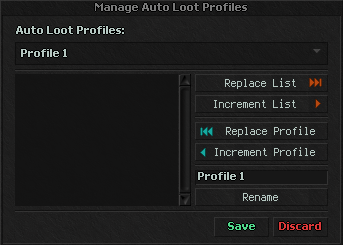
### **Manage Auto Loot Profiles**
{% hint style="success" %}
Allows saving your loot list in different profiles, making quick switching easier.
{% endhint %}
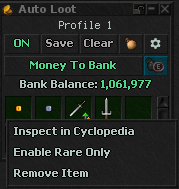
### **Enable Rare Only**
Allows configuring **per item** if you want to collect **only rares**
> Considers rarity **equal to or higher than *****Uncommon***.
{% hint style="success" %}
It is necessary to select **the item individually** with the right button > Enable Rare Only, so that the selected item will be acquired only if it has a rarity higher than Common
{% endhint %}
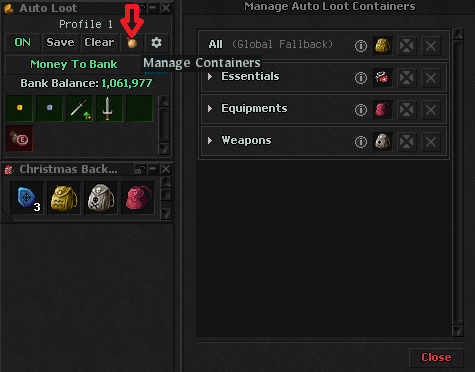
### **Manage Containers**
Allows you to configure specific backpacks for different item categories in Auto Loot! \
The system automatically organizes collected items into the correct backpacks.
{% hint style="success" %}
**How It Works:**
* Click on "Manage Containers" in the Auto Loot window
* **Configuration Hierarchy:**
* **All (Global):** Sets a default backpack for all items
* **Groups:** Configure backpacks for entire groups (Essentials, Equipments or Weapons)
* **Specific Categories:** Override with specific backpacks for individual categories (Armors, Gold, Valuables, etc.)
{% endhint %}