# Hotkeys
Even though it is a server with several exclusive mechanics and features, **Exordion preserves the essence of Tibia 7.4**. Therefore, **it is not possible to use runes or items directly via hotkeys**, with the exception of the special cases listed below.
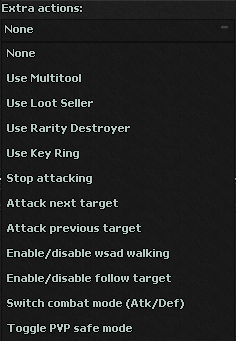
In the traditional format, hotkeys would only serve for texts (such as spells or speech). However, **thinking about quality of life (QoL)** for players, **we implemented some extra actions** that can be configured as hotkeys, expanding their possibilities without losing the old school proposition.
#### ⚙️ Actions available via Hotkey:
* **Use Multitool**: allows you to quickly use the item [**Multitool**](https://exordion.gitbook.io/exordion-wiki/en/systems/store) (eg: open and climb holes).
* **Use Loot Seller**: allows you to quickly use the item [**Loot Seller**](https://exordion.gitbook.io/exordion-wiki/en/systems/store), speeding up the sale of loot.
* **Use Rarity Destroyer**: allows you to quickly use the item [**Rarity Destroyer**](https://exordion.gitbook.io/exordion-wiki/en/systems/store) to destroy items with attributes.
* **Stop Attacking**: immediately stops the current attack.
* **Attack First Target**: Attacks the first creature in the battle list.
* **Attack Next Target**: attacks the next creature in the battle list (it is required that it is visible).
* **Attack Previous Target**: attacks the previous creature in the battle list (it is required that it is visible).
* **Enable/Disable WASD Walking**: enables or disables chat mode (allows toggling between typing in chat and walking with WASD).
* ⚠️ **Note**: By default, the key **Enter** already performs this function — **it is not necessary to configure it in hotkeys**, unless you want to change the shortcut.
💡 **Important**: Items and runes **cannot** be used directly via hotkey, maintaining fidelity to the classic style.